
http://chronicle.com/article/New-Question-for-Professors-/126073/?sid=wb&utm_source=wb&utm_medium=en
(Thanks to Alistair for this link)

Interview with David Cropley, Associate Professor in Engineering Innovation, School of Electrical and Information Engineering, University of South Australia.
Assoc. Prof. David Cropley has been using Moodle for one of his Masters Degree in Military System’s courses this year and has given Moodle two thumbs up. He was one of the first at UniSA to use Moodle and began exploring the software on the recommendation of a colleague who had experienced success with Moodle. Whilst discovering what Moodle could do for his students and colleagues, Assoc. Prof. Cropley learned that UniSA were also looking at Moodle to replace the current, yet ageing, UniSAnet.
His decision to use Moodle was based on a colleague’s suggestion that it seemed to do a good job. “Once I started to look into it a little bit more, I found it certainly offered more useful features compared to UniSAnet that would help to meet our goals. It probably does a better job than UniSAnet in facilitating the student interaction and getting them to be more involved in participating in the things that are going on each week.”Assoc. Prof. David Cropley currently has completed one delivery on his first Moodle course, with a second course now underway. Development of further courses is ongoing with two more coming on board next year. Twelve months from now the full complement of eight courses should have a Moodle homepage.

“I certainly think it is easier to use than UniSAnet and it is more user-friendly from my point of view. It is easier to sit down, log on to it and do the things I need to do in terms of looking at the discussion forums and quizzes. It is certainly straight forward to use and did not take a lot of time to become reasonably conversant with Moodle. It has not created such an overhead that you think that it is too hard to use. It has always been easy enough to use or quick and easy enough to work out problems, so I have always been encouraged to keep using it.”
When quizzed about his top five features of Moodle, Assoc. Prof. David Cropley suggested the calendar was particularly useful for keeping students organised and on track. “The calendar feature alerts the students to milestones during the course. I think it can result in better learning outcomes if you give the students a slightly rigid structure.” Additionally he liked the quizzes and forums as these provided formative assessment which could be recorded in the Grade Book. “I could just leave it and then wait for the end of semester to tally it all up.”
He found the groups and groupings somewhat tricky to use but thought it was very useful as course participants included not only award students but also a small number of professional development people and it made it possible to create two views of the homepage. “It proved to be fantastically useful because we created one website and the users did not know that they were seeing something different from other people. Once I had worked out the structure of the groups and groupings it made it very easy to have two very separate customers but one webpage. That was very efficient for us.”
Assoc. Prof. David Cropley believed that it was a bit early to assess the success of the introduction of Moodle to his Masters Degree courses but believed that results he had seen so far were encouraging and that the students’ reactions had been very positive. “I would say that the comments that I have had from the students have endorsed the fact that they have found this flexible and they are able to fit it around their full time work”.
He is looking forward to continuing his association with Moodle over the next twelve months as he and his colleagues develop Moodle homepages for all eight courses. “The more I have used it, the happier I have become with it. It is proving to be flexible and doing everything we want it to do. I can’t say anything bad about it”.
 ents to apply reasoning. However, this would not work as well with synthetic courses, something like a design course for example – where the problems are open ended and have infinite combinations of solutions. I see this as a limitation. But this is a tool and there is no such thing as a universal tool. We have to use it where it fits best.
 exam. The subjectivity in the course is removed. The marks are automatically and instantly awarded. It’s a brutally honest system. To avoid academic dishonesty, with a handful of students taking the tests for their colleagues, the questions are randomly chosen from a test bank, with the questions and answers shuffled.
 Last weekend I participated in the MERLOT conference (Multimedia educational resource for learning online and teaching) in San Jose in California - but as a remote delegate. This meant that I
Students saw growth in their knowledge
Another advantage is file preservation. If the students upload their work regularly, they reduce the risks of losing files or having their files corrupted.
Students can create a personal page with a photo of themselves, a few of their aspirations and a some personal background allowing academics to get know the students on a personal level and not just their name and ID number. If webfolios are used across multiple courses, the students can just call up this page into each course webfolio.
Disadvantages:
To utilise some of PebblePad’s features the students need to upload their work regularly, but many were reluctant to do this. Few students took the opportunity to respond to the feedback we provided and make changes to their work before it was formally assessed.
Some students did not understand the importance of sending their work to the gateway. We also had the issue of students thinking they could use the one webfolio for two courses resulting in some students sending work to the wrong gateway.
PebblePad is an interesting repository for work but the way it is structured, asset tracking and asset finding is not very user friendly. Asset management issues included students deleting files and breaking links between files, or updating a file and not updating the hyperlinks resulting in missing files. All we see is what students link to their webfolio, not the work that they have uploaded into PebblePad. Additionally, some students compressed their work up in file formats not able to be opened by the university computers. The students needed to resubmit in the correct zip file format. We held a session on webfolio development but less than half the students attended that session. The students who attended the session found it much easier than those who did not.
In hindsight, I realise that I should have asked the students to submit a single zip file each week and post a reflective comment about that week’s work rather than submitting up to 10 files for a week. Accessing multiple files is very time consuming in PebblePad.
A passionate group of students absolutely disliked PebblePad as it was either too difficult to use or too simplistic in its capabilities. Others wanted to personalise it to the limits that other web authoring software allows. PebblePad did not easily allow this. The other drawback of PebblePad is that we were looking at engineering drawings and whilst it allows viewing of jpegs their resolution was not high enough for us to read these drawings very clearly and individual files had to be opened in a series of cascading menus to view their work and this became quite time consuming.
Future Directions
Some of the improvements that could be made to Pebble Pad are to give it a corporate UniSA rather than a primary school feel. I would like to see it re-badged, corporatised and the PebblePad name removed. The interfaces, the fonts and low-tech look of it do not appeal to engineering students.
 I still think that e-portfolios are a good learning tool for the students and they integrate and roll everything in together. The students have a record of their learning, which they can reflect on if they want to. My advice to other academics would be to get on board and use some of these developments that the university is resourcing and not try to do these things on your own, but have the corporate body backing you. After my experience with PebblePad this year, I would love to use some form of effective, interactive, feedback providing, reflective online submission method in the future.


Students reflected on their modes of learning
The students might be inclined to put off their thinking about the graduate qualities until they near graduation, however, presenting a series of questions that they have to answer about their current personal development makes them reflect on this and helps them to think very clearly about the skills they are developing even at this early stage of their studies.
Self-assessment using the Profile tool in PebblePad
I also used the profiler tool to ask the students to reflect on their effort and learning in the course, and predict their grades. I was surprised at the number of students that self-rated themselves quite low and identified that they did not put a huge effort into the course. They included many comments to justify why this was the case. Some students did think they deserved a HD, whereas other students thought they deserved a C and suggested that they had understood most of the course but had a few difficulties here and there. Some self- rated themselves as a P2 and commented that they did not try too hard, but thought they had done enough to scrape over the line. A couple of students rated themselves as an F and explained that they had not had the time to put the effort into the course. I was very surprised at how accurately they predicted their grades, probably within one grade. It really showed to me that the students do acknowledge the amount of work they put in and they do aim for a grade. They are not all after a HD for an assignment, they might like it but in reality, they are just going to do enough work to get the grade they are aiming for.
It was very easy using the profiler tool. The reporting function allows quick and easy access to information provided by the students. However, there is so much functionality in PebblePad that we still have not used.
The web site was simplified as much as possible. We separated the web site into two sections - Teaching and Learning. The Teaching section contained e-readers, journals, books, solutions and PowerPoint presentations. The Learning side contained the interactive elements –the discussion groups and quizzes.
Addressing Stage 1, “Access and motivation” the front page was welcoming and outlined all the main folders and features of the course site. Students were reassured and encouraged to take time to become familiar with the site and information available on it. There was one face to face lecture that demonstrated the online environment to the students. I walked them through the different components of the web sites, highlighting the critical components – 3 discussion boards. One was a lectures notice board, one was a group discussion board where students could only access their own group (~10 students) and the final one was a general discussion board. Students were shown where regular communication occurred. I also provided a consultation time for those who needed one-on-one support mostly for technical support.
Stage 2 is “Online socialization”. The first activity was to ask students to introduce themselves online and provide some background in relation to work experience and qualifications and what their aspirations were. The communication rules were also spelt out.
In Stage 3 “Information exchange” the students were required to respond to another’s post in their discussion group. This gave them the opportunity to access work from at least one other student or the entire group if they wanted to, and the chance to peer review. I used weekly online quizzes to allow the students to self-assess their knowledge of the topic and become aware of where the gaps were in their knowledge and opportunities for development. To build up and establish the groups online e-tivities were assigned two weeks apart.
Stage 4 relates to “knowledge construction” – and this is where the students were working in groups. Most groups were communicating quite well and some were already tackling the group assignment in an organised fashion.
This sense of “development’ relates to Stage 5. Students spoke more freely and expressed themselves more openly online as compared to in lecture and tutorial setting. Communication was also more immediate with some students checking the discussion board daily.
As a online teacher it was an interesting experience. You could see the groups forming through the discussion board to become active and supportive of each other – finishing by exchanging telephone numbers and meeting times. For me it was important to keep track of their contributions so that the ‘quieter’ students didn’t get left behind. This was a bit tricky at times, especially as some students have similar names. Those students who weren’t making postings were encouraged by other students and if they disappeared for too long were emailed by myself. Concerns about their expression of English was common – but after I reassured them that they were not being assessed on spelling and grammar, that they became more active in the discussion.
The student evaluations of these learning experiences has been very positive particularly the way that this learning can be applied in real situations.
The UK-based Oxford Centre offers online courses for academic development. Although pricey (265 Pounds for 5 weeks of online interactivity) - they are a highly regarded service. I would highly recommend the experience of being an online learner to anyone who wanted to improve their online teaching. Some of the upcoming sessions are:
 Why not!
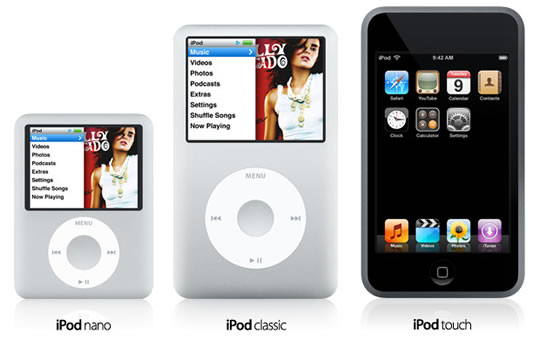 Currently we don't have any automated systems to do podcasting or lecture capture at UniSA - although last year we were close to getting Lectopia - an automated record and publish tool installed in lecture theatres - but for some reason it all faded away. If you want to make recordings you need to have access to your own (school's) recorder.
1.1.4 Assessment tasks should be diverse.Assessment practices should be inclusive and support equity principles, catering for both individual and group diversity. It should be recognised that all assessment models have limitations and a capacity to disadvantage certain students. Every effort should be made to minimise such disadvantage by, for example, using a variety ofassessment techniques. Inclusive language must be used to avoid gender, racial, cultural or other language bias.


 Posts
All Comments
Posts
All Comments


